Steinberg Nuendo 3.1

06/09/2005 por Soyuz
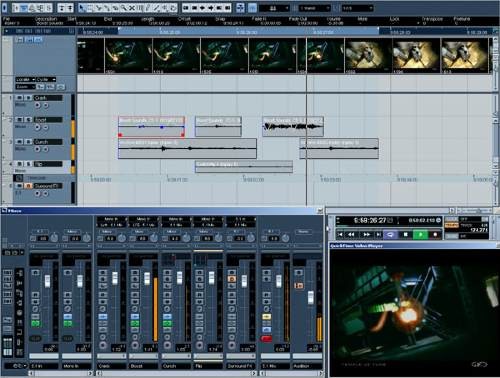
Steinberg presenta la versión 3.1 de su software estrella para postproducción de audio, cine y TV.

Novedades en Nuendo 3.1

  • Función Audio Pull Up/Down
  • Frecuencias de frame HDTV
  • Funcionalidades de red extendidas
  • Protección contra pérdida de datos
  • Rendimiento en OS X mejorado
  • Pre-caché de thumbnails de vídeo
  • Diversas mejoras en el flujo de trabajo
  • Funcionalidad de paneo "Equal Power"
  • Auto Edit para dispositivos de 9 pines
  • Soporte del protocolo Euphonix [ EuCon ]

Descarga
·
Pulsa [ aquí ] para descargarte esta actualización

Steinberg ]

Comentarios
  • #1 por Antonio Escobar el 07/09/2005
    Hombre, faltan bastantes cosas:<br />
    Steinberg has released Nuendo v3.1.0.934, adding the following new features:<br />
    Video<br />
    * Audio Pull up / Pull Down.<br />
    * Support for HDTV frame-rates.<br />
    * Thumbnail Pre-Cache option.<br />
    Network Collaboration<br />
    * Support for markers.<br />
    * Online Merge functionality.<br />
    Mixing<br />
    * Mixing and Monitoring of External Instruments in VST Mixer.<br />
    * Copy/Paste channel settings for multiple selected channels in one go.<br />
    * New Panner Mode: Equal Power.<br />
    * Panner Bypass Function.<br />
    * New Key Command Set for Mixer functions.<br />
    * Command Target filters for Mixer functions.<br />
    * Inspector sub-section for MIDI Tracks routed to a VST Insert Plug-in.<br />
    Files and Formats (Import and Export)<br />
    * Exclude Media when exporting Tracks as Track Archive.<br />
    * Select individual Tracks when importing a Track Archive.<br />
    Recording and playback<br />
    * Smart controller reset after recording.<br />
    * Recovery of audio recordings after system failure.<br />
    * New precount options, sensitive to tempo and time signature changes.<br />
    * Optional Sample-Rate Conversion when importing Tracks.<br />
    Editing<br />
    * Freeze Function for External Instruments and FX.<br />
    * Glue multiple parts with single mouse-click.<br />
    * Glue all following parts on selected track.<br />
    * New Crosshair-Cursor option.<br />
    * Process Bars in Tempo Track.<br />
    * Duplicate Track option.<br />
    * Freeze MIDI Track Play Parameters.<br />
    * Optimize Display when dissolving Parts.<br />
    * Apply Legato to selected notes only.<br />
    * Select equal Pitch > all Octaves/same Octave for all Positions.<br />
    * Transpose for single or multiple Audio Events via Info Line.<br />
    Project/General<br />
    * New “External Instruments” options in VST Connections.<br />
    * External Instruments added to VST Instrument Rack.<br />
    * Associated External Instruments Track Inspector added to MIDI Track.<br />
    Inspector<br />
    * Associated Audio Track Inspector added to MIDI track inspector routed to VST Insert Plug-in.<br />
    * External FX/Instruments Favorites.<br />
    * Advanced CPU-saving scrubbing mode.<br />
    * New Appearance options: Brightness, Contrast and Saturation.<br />
    * Sophisticated user-definable level meter coloring.<br />
    * Automatic Track Coloring.<br />
    * Incremental Auto-Save.<br />
    * Track Folding: Toggle Selected Track.<br />
    * Track Folding: Fold/Unfold Tracks.<br />
    * Track Folding: Flip Fold States.<br />
    * Resize Tracks without selecting.<br />
    * OSX Performance Optimization: integrated support for MacOSX Quartz 2D graphics system.<br />
    * Additional Processor Optimization: support for DualCore and Multi-Processor PC systems (systems with more than two processors).<br />
    * Safe Recovery of corrupt projects after system failure.<br />
    MIDI & Music<br />
    * MIDI Output Delay Compensation for External Instruments.<br />
    * Associate MIDI Device to External FX.<br />
    * Associate MIDI Device to External Instruments.<br />
    * Option to convert MIDI Controller Lane volume data to Track Automation volume data.<br />
    Studio Connections<br />
    * Studio Connections Audio Integration.<br />
    Remote<br />
    * Access Mixer Device Panels (user Panels) from Hardware Remote Controllers.<br />
    Various<br />
    * Preferences: Redesigned Appearance settings panel.<br />
    * New preference: Use Up/Down Navigation Commands for selecting Tracks only.<br />
    * New Preference: Default Track Time Type (Audio and MIDI).<br />
    * New Preference: Auto Track Color Mode.<br />
    * New Preference: Sync Project and Mixer Selection.<br />
    * New Preference: Deep Track Folding.<br />
    * New Preference: Enlarge Selected Track.<br />
    * New Preference: Select Channel/Track on Solo.<br />
    * New Preference: Select Channel/Track on Edit Setting.<br />
    * New Preference: Maximum Backup Files.<br />
    * New Preference: Insert Reset Events after Record.<br />
    * New Preference: Chase Events – Chase not limited to Part Boundaries.<br />
    * New Preference: Option to export warnings as text file.<br />
    * New Preference: Warn on Processing Overloads.<br />
    * New Preference: global Tail value for External Instruments and FX.<br />
    * New Preference: Map Input Bus Metering to Audio Track (in Direct Monitoring).<br />
    * Single Key command to open and close Pool Window.<br />
    * New Key Command to open Device for selected Track.<br />
    * Appearance: User-definable intensity for active drum lane.<br />
    * New Key Command to toggle status of “Select Channel/Track on Edit Settings” .<br />
    Más un chorro de Bug fixed estúpidos que nunca deberían haber estado...
Regístrate o identifícate para poder comentar