Has probado a hacerlo como dice el manual y no te funciona?
Setup Example for Cubase 4-6
To setup the Moog Music VST-AU Little Phatty EditorTM for Cubase SX 2-3 or Cubase 4-6:
1. First be sure to open Cubase 'MIDI Setup' dialog and deactivate the MIDI ports you will be using to connect the Synth to the Editor. Be sure to check your Host's VST Instrument plug-ins folder to make sure the Editor got installed there properly. Also make sure the License Key and Preferences files are copied to the same folder as the plug-in.
2. Open Cubase.
3. Create a new project.
4. Open your 'VST Instruments' panel and then select the 'Moog Music VST-AU Little Phatty EditorTM' VST in a VST slot. Add a MIDI Track for this if you want one (useful for MIDI keyboard control to the Synth).
5. Click the 'MIDI Setup' button in the Editor and select the MIDI Input and Output port your Synth is attached to.
6. Open the 'MIDI Monitor' view to make sure data is transmitted properly between Synth and Editor.
7 If you are running the software for the first time, you will need to load the default bank file into the Editor via the 'Patch Manager'. Once loaded and saved in your host, your host should remember the settings you last used automatically. You should always save your bank files manually to be certain you are not losing anything important.
Automation:
1. Select the track the Editor is on. In the 'VST Instrument' track you will see one automated parameter showing called 'Volume', you can use the menu there to select the parameter(s) you wish to automate. Please refer to the Cubase User Manual for more information on using automation.
#365 A ver si es que hiciste como yo xD En boton de AMOUNT del LFO, si lo mantienes pulsado, parpadea, y hace como de Pitchwheel... Ajustando la rueda al minimo, haras que el LFO no haga nada. Si lo subes, pues hace. Asi pues, prueba a mantenerlo pulsado onemoretime hasta que parpadee, y sube el valor de la ruedecita, luego pulsalo otra vez hasta que deje de parpadear.
Si aun asi no va, o bien tienes algun control por ahi que esta enviado valores al Pitchwheel o es que has tocao algo en las opciones del LFO del menu del SLIM.
manual... manual de usuario...
Cuenta razón tienes paosciante...
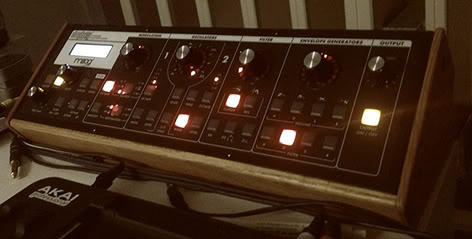
que guapeton queda con su cajita de madera john!
manual?
vale,vale.
estoy con el traductor de google,porque no lo tengo en español.
Cuco de cojones la verdad... pero lo compré así... y menos mal porque me parece un robo 100 pepinos por la maderita...
Buenas gente, es posible que me añada al club. Me quiero pillar un analógico y el slim tiene todos los boletos para venirse conmigo. Tengo un par de dudillas: 1) Esta os puede parecer una pregunta tonta pero nunca he tenido hardware analógico: En el Cubase 5, ¿se le pueden mandar datos midi escritos en el piano roll al igual que en los sintes soft?
2) ¿Es muy complicado automatizar los parámetros desde este Daw?
3) Alguien que también tenga el Tetra, ¿cual de los dos me recomienda?
No se puede explicar mejor




](https://statics.soniccdn.com/images/smilies/eusa_wall.gif "](*,)")





 No esperes un VSTi, es in sinte. Y por cierto, tarda en afinarse bastante.